
What Is OrDrumbox?
OrDrumbox is a free online drum machine and multi-track step sequencer that runs directly in your web browser. It allows you to create and edit drum patterns, experiment with rhythmic structures, generate bass lines and design electronic sounds without installing software.
The application combines a step sequencer, rhythm-generation tools, sample-based drum tracks and an integrated software synthesizer. It can be used to create patterns for House, Techno, Hip-Hop, Rock, Chiptune and experimental music.
Multi-Track Step Sequencer
The step sequencer is used to arrange sounds over a sequence of rhythmic steps. Each track can have its own settings, allowing different rhythmic patterns to run together.
- Pattern editing: Add, remove and edit notes using the sequencer grid.
- Independent track lengths: Set different loop lengths for individual tracks.
- Polyrhythms: Combine loops of different lengths to create overlapping rhythmic cycles.
- Euclidean rhythms: Generate rhythmic patterns by distributing beats across a sequence.
- Swing and groove: Adjust the timing of notes to change the feel of a pattern.
- Note and track controls: Adjust pitch, volume and stereo panning, with additional controls for triggers, repetitions and modulation.
Automatic Rhythm and Pattern Generation
OrDrumbox includes tools for generating and modifying musical patterns. These features can be used to create initial rhythmic ideas or explore variations of an existing composition.
- Generate drum patterns automatically.
- Regenerate individual tracks while retaining the other tracks.
- Generate bass lines and melodic material.
- Explore variations in rhythmic patterns.
- Combine generated material with manually edited sequences.
Integrated Software Synthesizer
The built-in synthesizer generates electronic sounds using oscillators, filters and modulation. Its parameters can be adjusted to create different timbres without relying exclusively on prerecorded samples.
The synthesizer includes:
- Three voltage-controlled oscillators (VCOs).
- ADSR envelope controls for shaping sounds over time.
- Resonant filters for modifying the frequency content.
- Low-frequency oscillator (LFO) modulation.
- Parameters for creating bass sounds, leads and experimental electronic timbres.
Drum Kits and Audio Samples
OrDrumbox includes several drum kits and demo patterns that can be used as starting points for new compositions. The available sounds cover acoustic percussion, vintage drum-machine sounds, electronic drums and retro-style effects.
Users can also import their own audio samples to create custom drum kits and adapt the sound of individual tracks to their projects.
Music Composition and Experimentation
OrDrumbox combines sample playback, synthesis, sequencing and automatic generation in a single browser-based application. These tools can be used independently or together to develop rhythmic patterns and more elaborate musical arrangements.
Possible uses include:
- Programming drum grooves and percussion sequences.
- Creating polyrhythmic and Euclidean patterns.
- Developing bass lines alongside drum tracks.
- Designing electronic sounds with the integrated synthesizer.
- Modifying generated patterns through manual editing.
- Experimenting with rhythmic structures and sound combinations.
Saving and Exporting Music
Patterns can be edited and saved for future use. Audio export allows compositions to be rendered as WAV files for playback, sharing or further processing in a digital audio workstation (DAW).
OrDrumbox can therefore serve as a standalone browser-based composition tool or as part of a larger music-production workflow
Creative Composition and Experimentation
OrDrumbox combines drum sequencing, sound synthesis and automatic pattern generation in a single environment. These features allow users to experiment with different rhythmic structures, combine samples with synthesized sounds and develop musical ideas through successive edits and variations.
- Create and arrange multiple drum patterns.
- Experiment with unusual time structures and polyrhythms.
- Generate rhythmic variations automatically.
- Combine synthesized sounds and audio samples in the same project.
- Develop evolving electronic patterns by modifying track settings and sequences.
Browser Compatibility and Supported Devices
OrDrumbox runs in a web browser and does not require a conventional software installation. Its operation depends on browser support for the Web Audio API and other web technologies used by the application.
- Windows: Use a compatible modern browser.
- macOS: Run the application in a supported browser.
- Linux: Use a compatible browser with audio support.
- Chromebooks: Access the application through the browser.
- Tablets and mobile devices: Use a modern browser, subject to device performance and interface compatibility.
🎯 Perfect For Experimental music
New to orDrumbox? Explore the complete User Guide to discover every feature, or watch the video tutorial to start creating your first beat in minutes.
Open Source Music Software
orDrumbox is a completely free and open-source project released under the GPL v3 license. Contributions, ideas and improvements from the community are always welcome.
- GitHub: github.com/cadeli/ordrumbox-v2
- Official Website: www.ordrumbox.com
Screenshots
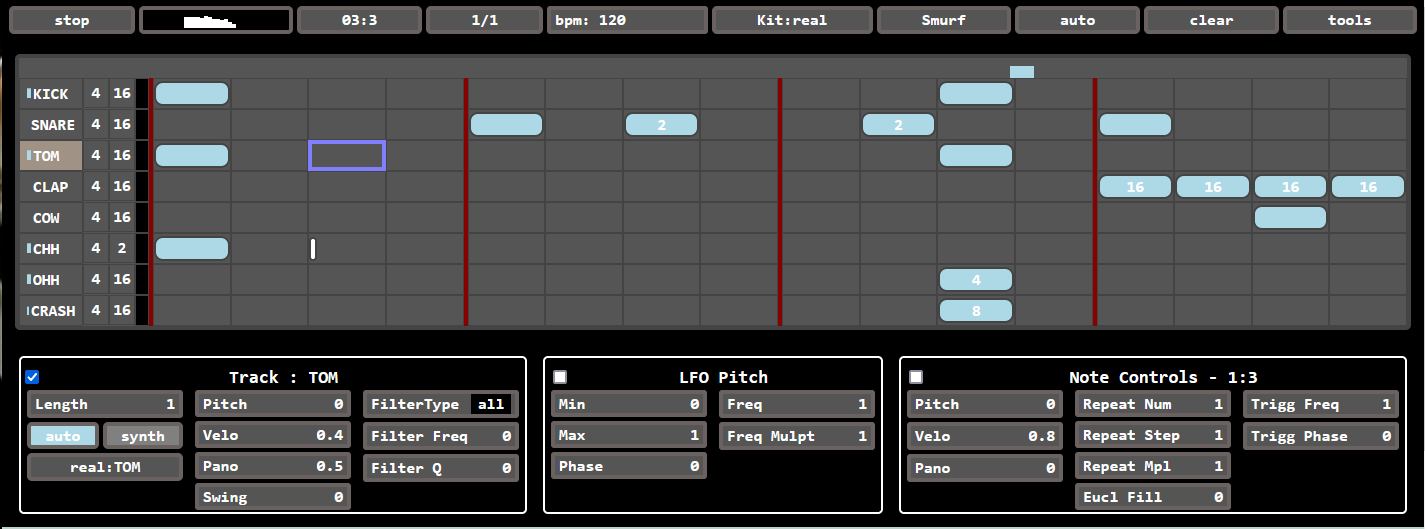
Click to see the full size screenshot for ordrumbox-v2.